
Version 1.3 preview: new comparison tools will be available after Chrome Web Store approval.
Free Chrome extension for Amazon shoppers
AZ Easy Review Score
Build your shortlist.
Compare the evidence before you buy.
No signup. Local scoring. No affiliate tagging.
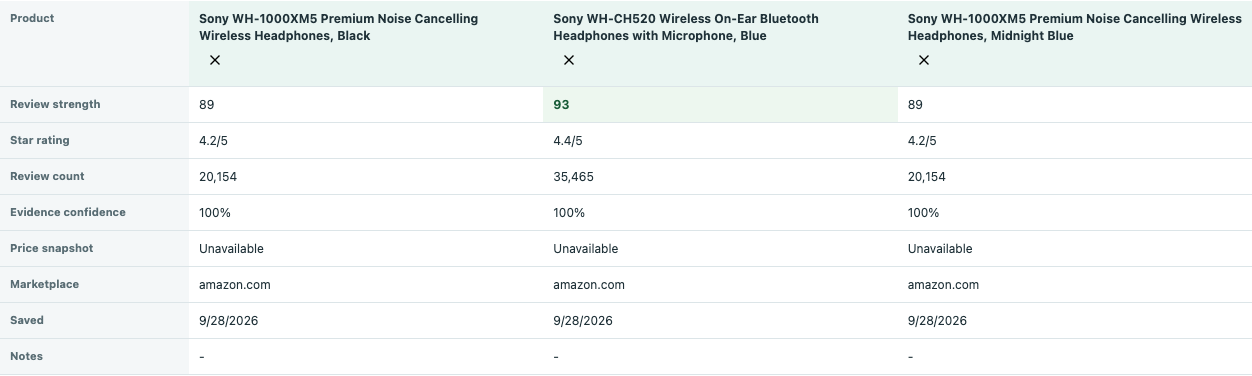

Keep the candidates
Save products as you browse. Your shortlist stays with you across pages.

Compare the evidence
See rating, review volume and price snapshots together, not in scattered tabs.

Make it yours
Add notes, organize lists and export your comparison. All included for free.
The extension, in action
One shortlist. A clearer comparison.
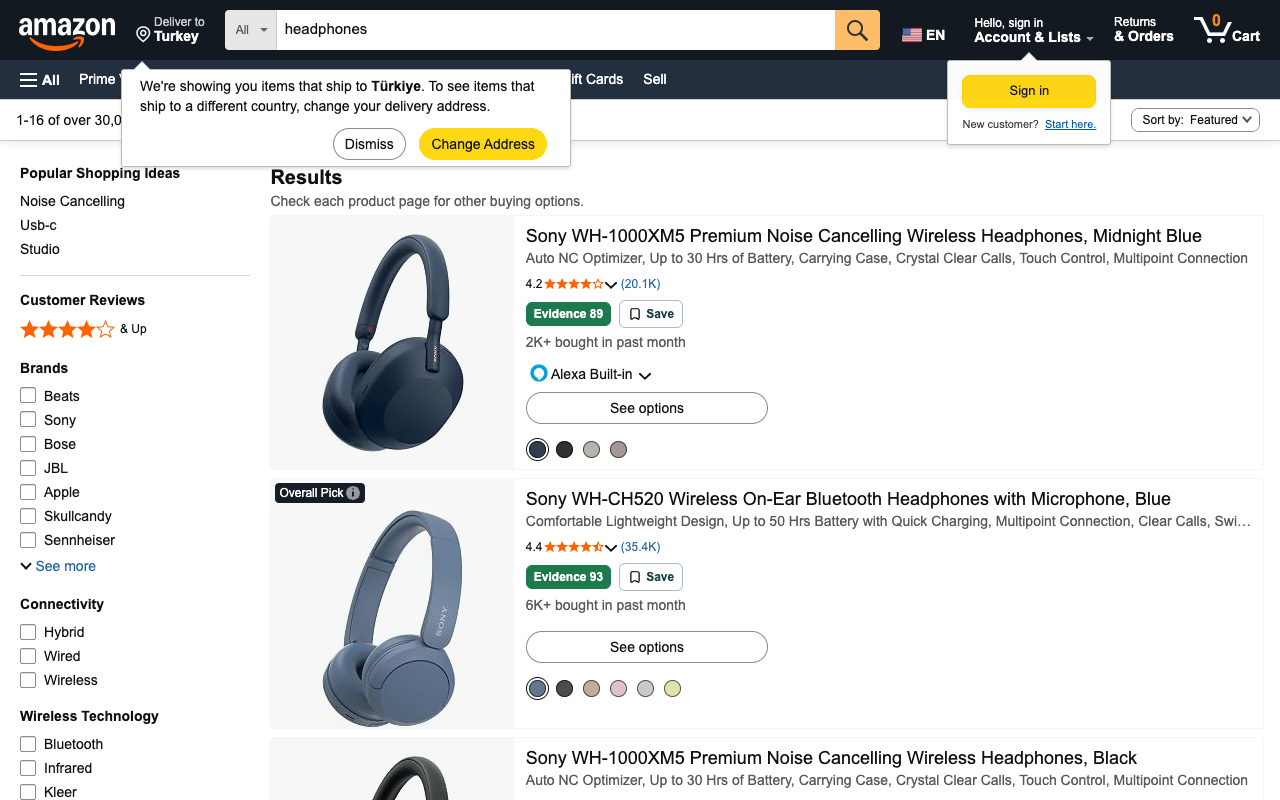
Beyond the star rating
More reviews can change the picture.
Review-strength estimates
A high star rating from a small sample is treated more cautiously. Scores combine ratings and review volume; they are not fake-review detection or a guarantee of quality.
Your comparison, your settings
Set a review threshold, switch scoring modes and save your presets. Optional value mode includes page-relative prices when comparing similar products.
Your library stays under your control
Saved products and notes stay on your device. Chrome sync is optional and off by default. No background price monitoring or access to your Amazon account.
Help shape what comes next
What would make Pro worthwhile?
We are exploring automatic alerts and advanced research tools at $24/year. This is a research survey, not an available subscription. Today's features remain free.
Support
A few useful answers.
Does it detect fake reviews?
No. It estimates review strength using public star ratings and review counts. Evidence confidence reflects review volume, not verified authenticity.
Are saved prices live?
No. Snapshots reflect the last time you saved a product. Revisit the product and save again to update it. Automatic alerts are not currently offered.
Which browsers and marketplaces are supported?
Chrome 116 or newer on desktop, across the supported Amazon marketplaces including the US, UK, Canada, Germany, France, Italy, Spain, Turkey, Australia, Japan, India, Mexico, Netherlands, UAE, Singapore and Brazil. Amazon layouts can vary; scores appear where usable product information is available.
Is it free?
Yes. Current scores, filters, saved lists, notes, presets, CSV export and optional Chrome sync are free. The Pro survey does not charge you or subscribe you to anything.
I do not see scores. What should I check?
Reload the Amazon tab after installing or updating, and check the scoring switch in the extension popup. Open a search-results or product page. If the issue persists, include your extension version and marketplace when contacting support; do not send account or checkout information.

Your next shortlist starts here.
Compare Amazon products without losing your place.
